nbase
Contact us
← All products

MULTICLOUD FINOPS

Turn scattered cloud costs into one explainable number.

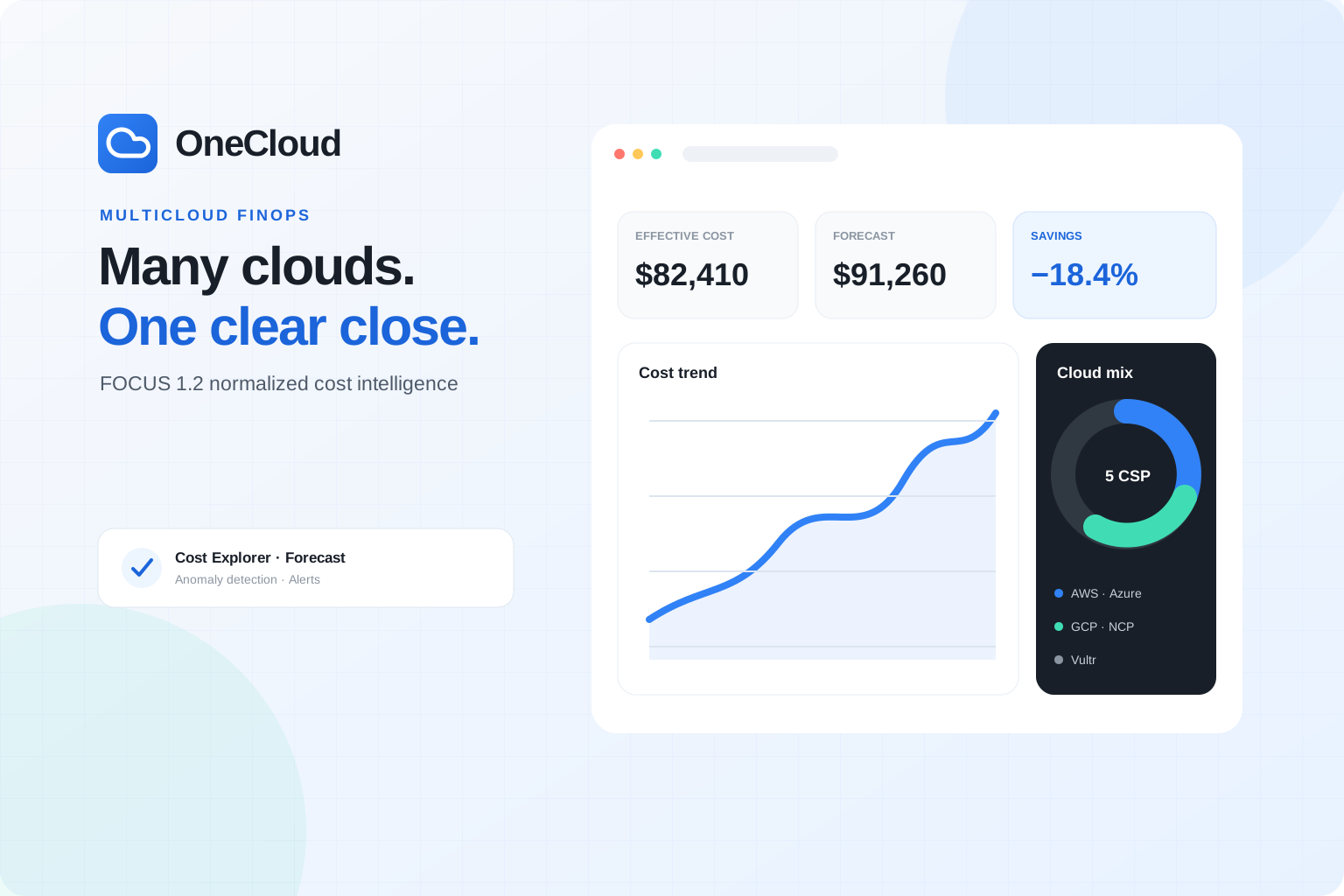
Normalize billing from AWS, Azure, Google Cloud, Naver Cloud and Vultr against FOCUS 1.2. OneCloud is a multicloud FinOps platform for cost analysis, forecasting, anomaly detection and alerts in one place.

OneCloud — Turn scattered cloud costs into one explainable number.. Product concept image

PRODUCT OVERVIEW

What does this product help you solve?

OneCloud is a multicloud FinOps platform that normalizes billing and usage data from AWS, Azure, Google Cloud, Naver Cloud and Vultr against the FOCUS 1.2 common schema. It compares cost by organization, project, service and tag on the same basis, then explains changes with line-item evidence so infrastructure and finance teams can close on one defensible number.

AWS · Azure · Google CloudNaver Cloud · VultrSlack · Teams · Email · WebhookBigQuery · Snowflake · S3 Export

CORE CAPABILITIES

Capabilities built for everyday work

01

FOCUS 1.2 cost normalization

Unify provider-specific billing exports and APIs into FOCUS 1.2 columns. AWS CUR and FOCUS Export, Azure Cost Management Exports, GCP BigQuery Billing Export, and the Naver Cloud and Vultr billing APIs can be analyzed in common units.

02

Actual, Amortized and Effective lenses

Compare billed cost, commitment-amortized cost and effective cost after discounts and credits in one view. Follow Savings Plans, Reserved Instances and credits down to the workloads they affect.

03

Allocation and chargeback reports

Break cost down by organization, project, service, tag, region and environment, then assign untagged spend to teams and products with rules. Prepare showback, chargeback and data exports for month-end close.

04

Forecasting and anomaly detection

Forecast 7-day, 30-day, month-end and quarterly cost with confidence ranges and key drivers. Detect unexpected spend through thresholds, change rates, new services and cloud-native anomaly signals.

05

Alerts and operational automation

Route cost, budget and anomaly signals to Slack, Teams, email, PagerDuty and webhooks. Team-specific routing and weekly or monthly digests turn findings into an operating workflow.

06

Least privilege and governance

Use cloud-recommended access such as AWS AssumeRole and GCP Workload Identity Federation. Evaluate RBAC, SSO and SCIM, audit logs and API logs for controlling access and changes across the organization.

IN PRACTICE

How your team could use it

USE CASE 01

Month-end cloud close

Finance and infrastructure teams compare bills from different providers using a shared definition. Review commitment, credit and FX evidence with department-level costs to prepare an explainable close.

USE CASE 02

Engineering cost optimization

Find cost changes and untagged resources by service, account, region and environment. Move from an anomaly alert to the contributing line items and prioritize optimization with the responsible team.

USE CASE 03

Multi-account enterprise governance

Connect accounts across organizations and projects under shared policy, then apply RBAC, audit logs and allocation rules. MSP, public-sector and financial environments can evaluate a tailored Enterprise setup.

Illustrative workflows based on product capabilities, not verified customer deployments or performance results.

HOW IT WORKS

From getting started to ongoing use

  1. 01

    Prepare cloud connections

    Issue an external ID and guide in OneCloud, then provision the least-privilege role or service principal for each provider.

  2. 02

    Enable billing exports

    Enable CUR, FOCUS Export, BigQuery Billing Export or the official cost API to begin line-item ingestion.

  3. 03

    Design cost structure and rules

    Organize projects and tags, then configure cost lenses, allocation rules and budgets for your operating model.

  4. 04

    Operate with forecasts and alerts

    Validate dashboards and reports, then connect anomaly detection, alert channels and scheduled digests to team workflows.

READY TO CONNECT

Platforms and integration

OneCloud does not install an application SDK or intercept service traffic. It connects only to official cloud billing exports and cost APIs. The published flow uses AWS STS AssumeRole with an external ID and GCP Workload Identity Federation, with provider-specific authentication for Azure, Naver Cloud and Vultr. Confirm required permissions, credential storage and rotation, and initial data latency in the guide for each provider.

AWS · Azure · Google CloudNaver Cloud · VultrSlack · Teams · Email · WebhookBigQuery · Snowflake · S3 Export

PRODUCT FAQ

Questions before adoption

  • Do I need to install an application SDK?
    No. OneCloud states that it connects only to each provider's billing export and cost API, without changing application code, infrastructure code or traffic.
  • How is this different from a provider's cost tool?
    Its core difference is aligning line items from several providers to the FOCUS 1.2 structure so they can share grouping, allocation rules and cost lenses. Evaluate the exact scope against your account model.
  • Will all data appear immediately after connecting?
    Billing exports need time to produce and ingest their first line items. The official site advises that the first dashboard may take 6–24 hours, so include that delay in the rollout plan.

OFFICIAL RESOURCES

Explore the official resources

Prepared from information published on the official OneCloud site in September 2026. Supported providers, plan features, retention, free-plan terms and certification scope may change; confirm the current official terms before contracting.

Official websites and documentation checked on September 24, 2026. Availability and terms depend on version, plan and integration environment.

Your business's next step,
starts with nbase.

Let's explore the software and implementation approach that fit your service.